
Bushel
BushelBusiness
2.7150.00 Reviews
- Version
- 9.0.1
- Installs
- 50.00K
- Age Rating
- Everyone
Screenshots
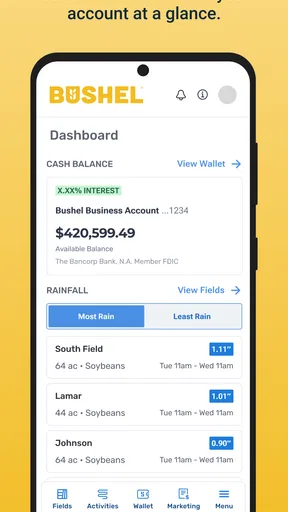
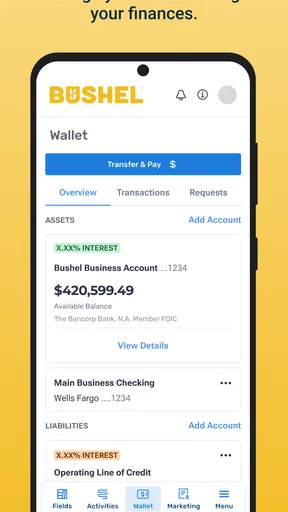
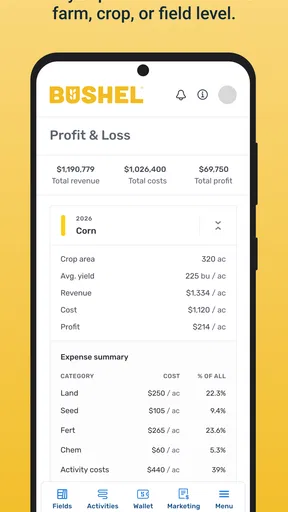
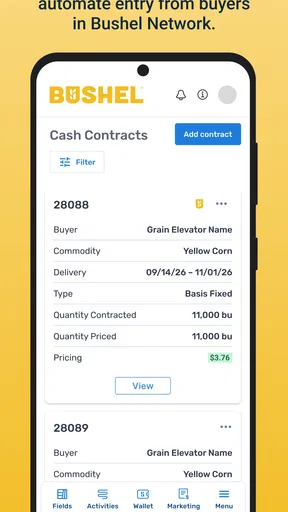
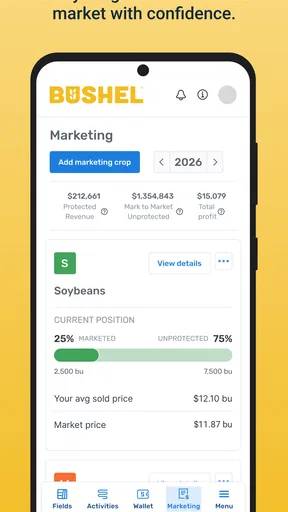
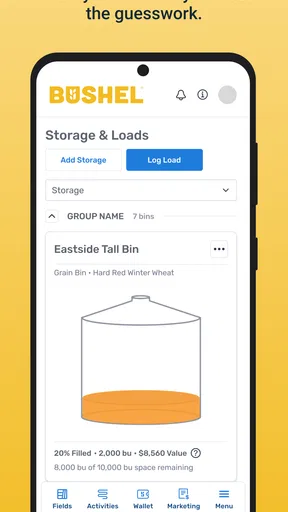
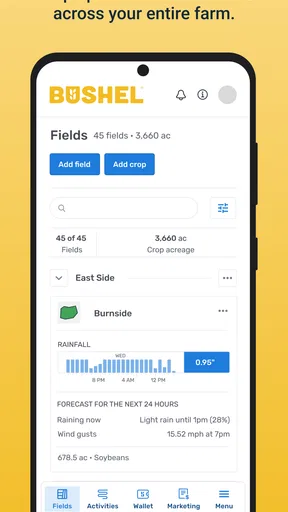
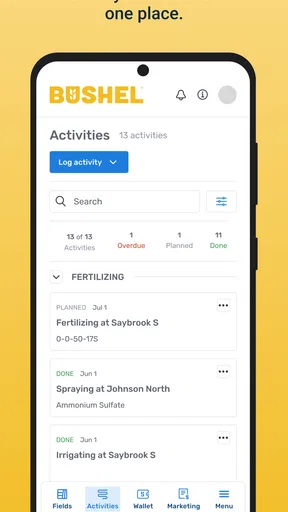
Our Review of Bushel
 Analysis by Appyee
Running a farm is not only about getting work done in the field. It also means keeping track of money, transactions, records, and the decisions that connect one season to the next. I approached Bushel as a practical business app for that part of farm life, rather than as a general-purpose finance tool. Its central idea is straightforward: bring farm management and financial activity closer together so the user can spend less time jumping between unrelated tools.
That focus makes sense for farmers who already have information scattered across notebooks, messages, spreadsheets, and separate business apps. At the same time, my experience with it left me with a mixed impression. The concept is useful, and the app can fit naturally into a farm workflow, but it is not the kind of polished, universal organizer I would recommend to everyone who earns money from agriculture. Whether it works well depends heavily on how much of your operation already fits its way of handling information.
From a farm task to a usable financial record
The most realistic starting point is a busy day when something happens that needs to be remembered later: a sale, a purchase, a payment, a balance to check, or a detail that affects the farm’s financial picture. In that situation, the value of a dedicated business app is not just storing a number. It is keeping the number connected to the farm activity that produced it.
I found the strongest case for Bushel in this kind of routine. Instead of treating farm finances as an occasional accounting exercise, the app encourages the user to make financial management part of the normal operating rhythm. That can be helpful when several people contribute to the business and the person doing the work in the field is not the same person checking the financial side.
The app comes from Bushel, a developer focused on this agricultural business space. It is listed as a Business app, and that description feels more accurate than calling it a simple calculator or a generic expense tracker. The intended user is someone managing an actual farm operation, where financial information is tied to production, sales, and ongoing decisions.
Before relying on it, I would first decide what I want it to replace. If the goal is simply to record personal spending, a normal budgeting app will probably be easier. If the goal is to manage a farm’s financial flow alongside its operational context, Bushel has a more relevant starting point. That distinction matters because a specialized tool can be more useful than a broader one only when its specialization matches the work.
One practical tip is to agree on a naming routine before entering anything. A farm may have several fields, crops, accounts, suppliers, or sales channels, and inconsistent labels quickly make later review harder. Even a simple internal rule, such as using the same wording for a crop or account every time, can make the information more useful when it is handed to another person or reviewed at the end of the week.
What I would prepare before using it
I would not begin by trying to enter the entire history of a farm. That creates work before the app has proved its value. A better approach is to start with one active workflow, such as current sales or a particular set of expenses, and use it consistently for a short period. This makes it easier to see whether the app fits the farm’s habits instead of judging it through a large, messy import project.
This is also where expectations need to stay realistic. Bushel is free to install, but the app includes in-app purchases ranging from around twenty dollars to two hundred dollars per item. I would treat the free entry point as a chance to assess the workflow, not as proof that every useful capability will remain free. A farm should understand the purchase structure before building an essential process around it.
The age rating is Everyone, which makes the app broadly accessible from a content perspective. That does not automatically mean every farm employee will find it simple. Accessibility in daily work depends more on clear responsibilities, device comfort, and whether the app’s terminology matches the operation’s language.
Moving information through the daily workflow
Once the starting point is clear, the next step is to turn an event into information that can be used later. I would approach this in three stages: capture what happened, connect it to the right part of the business, and review it before making a decision. The first stage is the easiest to overlook because farm work often happens under time pressure.
For example, imagine a farm manager finishes a delivery and needs the financial detail available to someone handling the office work. The manager’s immediate concern may be getting back to the field, while the office user needs a reliable record for reconciliation or planning. A useful workflow should reduce the chance that the detail remains in a text message, on a scrap of paper, or in someone’s memory.
With Bushel, I would make the first entry as close to the event as practical, then check the context before considering it complete. The important habit is not speed alone. It is making sure the entry can still be understood by another person who was not present when the transaction happened. That small handoff test is a better measure of usefulness than simply counting how quickly a record can be created.
A non-obvious advantage of this approach is that it changes the timing of financial work. Instead of waiting until the end of a long day or the end of a month, the user can deal with smaller pieces while the details are still fresh. That can reduce the mental load of reconstructing what happened later. The trade-off is that it requires discipline during the busiest moments, when opening an app may feel less urgent than the physical task in front of you.
I would also separate recording from interpreting. The first pass should capture the event accurately. The second pass should be used to look for patterns, check balances, or decide what needs attention. Trying to make a major business decision every time a record is entered can slow the workflow and encourage rushed judgments.
Where teamwork becomes the real test
The most important handoff is usually between the person who creates the information and the person who acts on it. On a small farm, that may be one person switching roles throughout the day. On a larger family operation or a farm with office support, it may involve several people with different priorities.
Bushel makes the most sense when everyone agrees that the app is part of the shared process. If one person records activity in the app while another continues using a spreadsheet and a third relies on messages, the benefit becomes much smaller. The problem is not necessarily the app itself; it is the lack of a single working routine.
I would establish a clear cutoff for review. For instance, a person handling field or delivery work could enter the event, while the person managing the office could review entries at a regular point in the day. That keeps the handoff visible without requiring everyone to monitor every change constantly.
Another useful practice is to decide what requires immediate attention and what can wait for review. A routine entry should not create unnecessary interruption, while an unusual amount, missing detail, or unexpected financial change deserves a direct conversation. This distinction prevents the app from becoming another source of alerts that people learn to ignore.
The app is also easier to evaluate when the farm defines its desired outcome first. Is the main goal cleaner records, faster communication, better visibility into finances, or less duplication? Those are related goals, but they are not identical. If the farm cannot name the problem it wants Bushel to solve, it may end up entering information without seeing a meaningful improvement.
What the completed workflow can deliver
When the process works, the result is not simply a collection of entries. It is a clearer path from farm activity to financial understanding. The person who made the original transaction can move on, the office user can see what needs checking, and the farm owner can use the resulting information when considering costs, sales, or upcoming commitments.
That is the main reason I see value in a specialized farm business app. A general finance app may handle money well but lack the agricultural context that makes a transaction meaningful. A spreadsheet may be flexible but depends on careful setup, consistent formatting, and manual maintenance. Bushel sits between those approaches: more focused than a blank spreadsheet, but potentially less adaptable than a system built entirely around a farm’s own structure.
The result is especially useful for farms that have outgrown informal record keeping but do not want to build a complicated system from scratch. It can give a team a common place to work and make financial activity easier to discuss. The benefit is organizational rather than flashy, and that is precisely why it could matter during a demanding season.
I would still verify important information before using it for a major financial decision. A digital record is only as dependable as the entry and review process behind it. If a transaction is entered under the wrong category, duplicated, or left without enough context, the app may make the information look organized without making it correct.
For that reason, my best practical suggestion is to schedule a short review rather than trusting the system passively. Look at recent activity, identify anything unclear, and correct it while the people involved still remember the details. This is one of the less obvious trade-offs of convenience: a central tool can reduce scattered work, but it can also hide mistakes behind a clean interface if nobody checks the underlying entries.
Where the workflow starts to break
The first friction point is adoption. Farmers often work in changing conditions, and the ideal moment to record something may arrive when the user is driving, handling equipment, meeting a customer, or dealing with weather. If entering information feels like a separate administrative chore, people may postpone it. Once several events are delayed, the quality of the record becomes dependent on memory.
The second issue is fit. A farm with highly specific accounting requirements, complex inventory, or established professional bookkeeping may need a more comprehensive platform. Bushel can be a useful operational layer, but I would not assume it replaces every accounting, tax, payroll, or enterprise-management system. Farms should compare the app with the tools already used by their accountant and business partners before making it the central source of truth.
The third concern is cost growth. The app itself is free, yet optional purchases can reach from about twenty dollars to nearly two hundred dollars for an item. That range may be reasonable if a paid capability removes substantial manual work, but it changes the calculation for a small operation watching every expense. I would test the core workflow first and only pay when the specific improvement is clear.
There is also a trust issue created by the average rating of 2.7 from around 470 ratings. That does not tell me exactly what every user experienced, but it is enough to make me cautious about recommending the app without a trial period. A farm should test it with real users, real handoffs, and a real week of work rather than judging it from the idea alone.
The current version is 9.0.1, and the app has been available since July 25, 2012. That long presence suggests an established product rather than a brand-new experiment, but longevity does not guarantee that its workflow will match a particular farm. I would still check how comfortably it runs on the devices used by the team and whether the current experience feels dependable enough for daily records.
Who should use it, and who should look elsewhere
I would recommend trying Bushel to a farm owner or manager who wants a more structured way to connect everyday activity with financial management. It is a particularly sensible candidate for a small or midsize operation where several people need shared visibility but nobody wants to maintain a complicated custom system.
It may also suit someone who has reached the limits of paper notes and scattered messages. The app’s value grows when the farm has enough activity that missed details create real follow-up work, but not so much complexity that a full enterprise platform is already necessary.
I would be more hesitant for a person who only wants a personal budget, a basic expense list, or a simple invoice tool. Those users may find a general finance app quicker and more familiar. I would also advise caution for a farm that already has a reliable accounting workflow and expects this app to replace professional financial software rather than complement it.
Device compatibility should be checked before committing. The minimum operating system is version 9, so the app is not aimed only at the newest phones or tablets. Even so, compatibility is only the first question. The more important test is whether the actual devices used in barns, trucks, offices, and fields make the workflow practical for every person involved.
My recommendation after following the full process
Bushel has a worthwhile purpose: it tries to make farm finances part of the same practical workflow as farm management. I like that direction because the real problem is often not a lack of financial information, but the distance between an event happening and that event becoming a clear, shared record.
My recommendation is measured rather than enthusiastic. I would install it for a controlled trial, choose one real farm process, define who enters information and who reviews it, and compare the result with the farm’s current method. If it reduces duplicate work and makes handoffs clearer, it may earn a permanent place in the operation. If the team avoids entering information or still has to rebuild everything elsewhere, the app is not solving the central problem.
For a free Business app from Bushel with an Everyone rating, it is easy to explore without turning the first step into a major commitment. Just remember that optional purchases can change the overall cost, and the modest 2.7 average from around 470 ratings is a reason to test carefully. My honest view is that Bushel is most valuable when it becomes a shared farm habit, not when it is treated as a magic replacement for every financial tool.
In the right operation, that shared habit can turn scattered farm events into information people can actually use. In the wrong one, it becomes another place to enter the same details. I would choose it for a farm seeking a focused bridge between daily work and financial oversight, while choosing a broader accounting or farm-management system when the operation needs deeper customization, formal reporting, or a complete business backbone.
Verdict
Strengths of Bushel
- Simple interface makes inventory tasks easy to learn.
- Supports barcode scanning for faster item entry.
- Useful for tracking equipment across multiple locations.
- Custom fields allow records to match different workflows.
- Cloud access helps teams view updated inventory remotely.
Limitations of Bushel
- Some advanced features may require a paid subscription.
- Initial catalog setup can take considerable time.
- Barcode scanning depends on a compatible device camera.
- Offline functionality may be limited in some workflows.
- Large inventories can feel harder to navigate without careful organization.
Similar Picks in This Category
View All
LinkedIn: Community & Network
LinkedIn3.8

Zoom Workplace
zoom.com4.1

Microsoft Teams
Microsoft Corporation4.6

Meta Business Suite
Meta Platforms, Inc.4.6

Webex Meetings
Cisco Systems, Inc.4.5

TeamViewer Remote Control
TeamViewer4.4
Frequently Asked Questions
What is Bushel, and what can I use it for?
Bushel is a digital platform designed to help users manage and organize agricultural information, transactions, and related business activities in one place. Depending on the services enabled for your account, you may be able to view grain-related details, monitor activity, access documents, communicate with participating businesses, and handle other farm-management tasks. Available features can vary by region, company, and account type.
Is Bushel free to download and use?
Downloading the Bushel app is generally free, but access to specific services may depend on your relationship with a participating grain company, cooperative, elevator, or other agricultural organization. Some features may require an eligible account, invitation, or enrollment through a partner. Before relying on the app for business activities, check whether your organization supports Bushel and whether any transaction, service, or account fees apply.
What information do I need to create or access a Bushel account?
Account requirements can differ depending on the Bushel service and the organization providing access. You may need an email address or phone number, personal or farm details, and an account connection with a participating business. In some cases, an invitation or verification code is required. Make sure the information you enter matches your organization’s records to avoid delays during registration or account linking.
Can I use Bushel to manage grain contracts, payments, or deliveries?
Bushel may provide tools for viewing or managing grain contracts, delivery information, settlements, payments, and other agricultural business records, but the exact options depend on the participating organization. Not every account includes every feature, and some actions may require approval outside the app. Review displayed details carefully and contact your elevator, cooperative, or grain provider if information appears incomplete or incorrect.
Is my information secure when using the Bushel app?
Bushel handles business and personal information through account-based access and security measures, but users should still take normal precautions. Use a strong, unique password, keep the app and device updated, and avoid signing in on shared or unsecured devices. Review the app’s privacy policy before registering, and contact official support or your participating organization if you notice suspicious activity or unexpected account changes.
